


You’ve registered your business, finalised your products, and sorted out logistics. Now comes the real question: Where do you actually start selling in Canada?
The Canadian e-commerce market is mature and relatively concentrated. Unlike India, where sellers can experiment across dozens of marketplaces, Canada is dominated by a handful of major platforms. On top of that, Canadian shoppers have long been comfortable buying from US brands, which means expectations around pricing, delivery speed, and product quality are already quite high.
The smarter approach is simpler: focus on the platforms that Canadian consumers already trust and shop on. Picking the right channels from the start can dramatically improve your chances of gaining early traction.
Amazon.ca
Amazon.ca is the dominant e-commerce player in Canada. Roughly 75% of Canadian online shoppers have bought from Amazon in the past year. For many categories, it’s the first place Canadians look.
Why Amazon.ca Matters?
Built-in traffic: Millions of Canadians shop on Amazon.ca every day, putting your products in front of active buyers without needing to spend heavily on ads.
Trust and infrastructure: Canadian shoppers already trust Amazon. With Prime, fast shipping, and easy returns, the platform offers logistics and credibility that would be expensive to build independently.
Low barrier to entry: You don’t need a website, payment setup, or large marketing budgets to get started- optimised listings can start generating sales quickly.
Market insights: Amazon is also a great testing ground for understanding demand, gathering reviews, and learning what works with Canadian customers.
How to set up on Amazon.ca?
Requirements:
Canadian business registration (corporation or sole proprietorship with GST/HST number)
Canadian bank account for payouts
Tax information (business number, tax ID)
Product information (UPCs/EANs, manufacturer info, safety certifications if applicable)
Account Types:
Individual Account: No monthly fee, pay CAD 1.49 per item sold plus referral fees. Works if selling under 40 items monthly- limited features, no advertising access.
Professional Account: CAD 29.99 monthly plus referral fees. Unlimited listings, access to advertising, bulk listing tools, and API access. Required for serious selling.
Start with Professional if you’re committed. The monthly fee pays for itself quickly once you’re moving volume. Referral fees (8-15% depending on category), FBA fees (15-30% of product price for storage, picking, packing, shipping), and advertising costs (15-30% of sales if you want visibility). All in, expect 35-50% of your revenue going to Amazon-related costs.
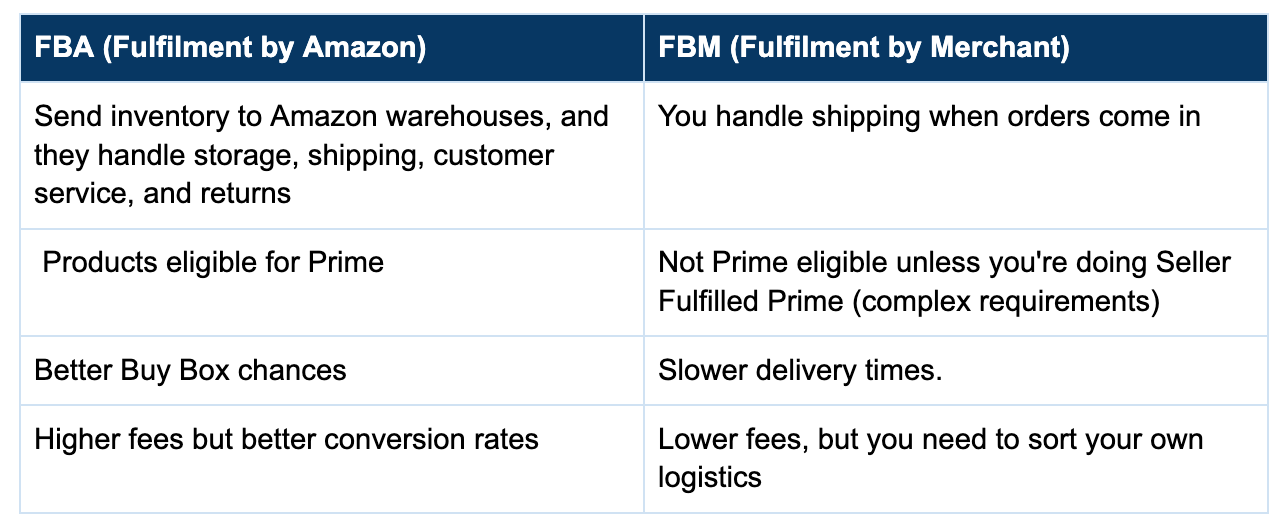
How to set up Fulfiment: FBA vs FBM?
When selling on Amazon.ca, one of the first decisions you’ll make is how to fulfil orders. Amazon offers two primary models: Fulfilment by Amazon (FBA) and Fulfilment by Merchant (FBM). The choice determines who handles storage, shipping, customer service, and returns, and it can significantly impact costs, delivery speed, and customer trust.
For most Indian brands, FBA makes sense. The infrastructure Amazon provides is worth the cost, especially early on when you’re learning the market.
How to optimise Amazon.ca listings?
Product Titles: Front-load important keywords. Include brand, key features, size/quantity. Amazon allows up to 200 characters, but focuses on the first 80-100 (what shows in search results).
Example: “Organic Turmeric Powder 500g - Pure Indian Haldi, Curcumin Supplement, Anti-Inflammatory Spice for Cooking & Golden Milk”
Bullet Points: Five bullet points highlighting key features and benefits. Start each with a benefit, then explain the feature.
Product Description: More detailed information. Address common questions and concerns. Use this space to tell your story if relevant (handmade, traditional methods, family recipe, etc.).
Images: Minimum six high-quality images. Main image on white background (Amazon requirement). Additional images showing the product from multiple angles, in use, size comparisons, packaging, and ingredients/materials. Infographics highlighting features work well.
Backend Keywords: 250 characters of hidden search terms. Include variations, misspellings, and related terms not in your title or bullets.
A+ Content (formerly Enhanced Brand Content): If brand registered, create visual product descriptions with images and formatted text. Significantly improves conversion rates.
How to price your product on Amazon?
Differentiate on quality, story, or features instead.
Amazon’s algorithm determines who wins the Buy Box (the “Add to Cart” button). So, monitor the factors that affect it, which include price, availability, shipping speed, and seller performance.
Factor in all costs: Amazon fees, shipping to FBA, storage, returns, and advertising. Then add your desired margin.
Use automated repricing cautiously: Tools exist to adjust your prices based on competitors automatically. Set minimum prices you won’t go below.
How to advertise on Amazon?
Sponsored Products: Your products appear in search results and product pages. Pay-per-click. Start here. Target relevant keywords, monitor ACoS (Advertising Cost of Sale), and optimise based on what converts.
Sponsored Brands: Your brand logo and multiple products in banner ads. Requires brand registry. Good for building brand awareness.
Sponsored Display: Product targeting and remarketing. More advanced, use once you’ve mastered Sponsored Products.
Budget 15-30% of revenue for advertising when starting. As you get reviews and optimise listings, you can reduce ad spend while maintaining sales.
How to approach Reviews and Ratings?
Products with fewer than 15 reviews struggle. 50+ reviews with 4+ stars are where sales really accelerate. 100+ reviews give you strong credibility.
Amazon Vine program (invites reviewers to review products in exchange for free products). Request reviews through Amazon’s “Request a Review” button (one per order, automated or manual).
Respond professionally to critical reviews through Seller Central. Address the issue, offer to make it right. Shows future buyers you care about customer satisfaction.
Shopify
Shopify is Canadian (founded in Ottawa in 2006) and the dominant global D2C e-commerce platform. Over 2 million merchants use Shopify, many of them Canadian.
Why Shopify Matters for Canadian D2C?
Direct customer relationship: You own the customer data. That means collecting emails, building a customer database, and remarketing directly, something marketplaces rarely allow.
Full brand control: From design and messaging to the overall shopping experience, your website reflects your brand exactly the way you want it to.
Stronger margins: Without marketplace commissions, costs are mainly your Shopify subscription (CAD 39–399/month), payment processing (around 2.9% + 30¢ with Shopify Payments), and marketing spend, often leading to better unit economics once you have steady traffic.
Greater flexibility: You can sell almost anything legally, bundle products, offer subscriptions or customisation, and run promotions without marketplace restrictions.
Multichannel selling: Shopify connects easily with platforms like Facebook, Instagram, Google Shopping, and even Amazon, allowing you to manage multiple sales channels from a single backend.
How to set up on Shopify?
Choose a plan: Shopify offers multiple pricing plans designed to support businesses at different stages of growth.
Basic Shopify: CAD 39/month. Good for starting out. Unlimited products, 24/7 support, sales channels, and discount codes.
Shopify: CAD 105/month. Professional reports, lower transaction fees if not using Shopify Payments.
Advanced Shopify: CAD 399/month. Advanced reports, third-party calculated shipping rates, and lower transaction fees.
Start with Basic unless you need specific features from higher tiers.
Provide a Domain Name: Register a .ca domain for credibility with Canadian customers. YourBrand.ca signals you’re serious about the Canadian market. .com works too, but .ca is preferred.
Select a Theme: Shopify has free and paid themes (CAD 200-300 typically for paid). Paid themes offer more features and design flexibility. Choose themes optimised for your product type (e.g., fashion, electronics, food).
Add Essential Apps: Once your store is set up, adding the right apps can help extend functionality, automate operations, and improve customer experience.
Klaviyo or Omnisend: Email marketing (abandoned cart recovery, welcome series, post-purchase flows)
Loox or Judge.me: Photo reviews with social proof
Privy or OptiMonk: Popup forms for email collection
AfterShip: Shipment tracking
Gorgias or Zendesk: Customer support ticketing
SEO Manager or Plug in SEO: SEO optimisation tools
Budget CAD 100-300/month for apps once you’re established.
Add Payment Processing methods:
Shopify Payments: Built-in and easy to set up, with competitive rates (around 2.9% + 30¢ per online transaction) and no additional third-party transaction fees. Powered by Stripe’s infrastructure, it supports all major credit cards and Shop Pay for faster checkout. A Canadian bank account is required to use Shopify Payments.
Alternative Processors: PayPal, Stripe (if not using Shopify Payments), Moneris. All work, but you’ll pay Shopify’s third-party transaction fee (0.5-2% depending on plan) in addition to processor fees.
For most merchants, Shopify Payments is the best option.
How to drive traffic to your Shopify Store?
Paid Ads
Budget at least CAD 1,500-3,000/month for paid ads to see meaningful results. Expect 30-60 days to optimise campaigns and understand what works.
Facebook/Instagram Ads: Highly targeted, visual format works well for consumer products. Start with a CAD 30-50/day budget. Focus on conversion campaigns once you have pixel data.
Google Ads: Start with branded search (your brand name), then expand to category terms.
TikTok Ads: Creative-driven platform. Products that demonstrate well perform best.
Organic/Content Marketing
SEO: Optimise product pages and create content targeting keywords your customers search. Takes 3-6 months to see results, but pays long-term dividends.
Social Media: Build a following on Instagram, TikTok, and Facebook. Post regularly, engage with the audience, and share authentic content.
Content Marketing: Blog posts, guides, recipes (if food product), style tips (if fashion), etc. Drives organic traffic and establishes expertise.
Email Marketing: Collect emails aggressively (pop-up offers, signup discounts). Email is your highest ROI channel once you have a list.
Influencer Marketing: Partner with Canadian influencers in your niche. Micro-influencers (10k-100k followers) often deliver better ROI than mega-influencers. Typical rates: CAD 200-2,000 per post, depending on follower count and engagement.
Partnerships: Collaborate with complementary brands, get featured in gift guides, and reach out to Canadian media/blogs for product features.
How to optimise for conversion on Shopify?
Professional Product Photography: Hire a professional photographer or invest in good lighting/equipment. Multiple angles, lifestyle shots, and detail images.
Clear Product Descriptions: Answer questions before customers ask. Benefits-focused, detailed specifications, sizing information, and material details.
Trust Signals: Customer reviews, “As Seen In” media logos, security badges, clear return policy, contact information readily available.
Mobile Optimisation: 60-70% of traffic will be mobile. Test your site on multiple devices: fast loading, easy navigation, simple checkout.
Abandoned Cart Recovery: Set up automated emails to send when someone adds items to the cart but doesn’t complete the purchase.
Fast Checkout: Minimise steps. Offer Shop Pay (one-click checkout for returning customers) and a guest checkout option. Clearly show shipping costs early.
Walmart.ca
Walmart Canada has been aggressively expanding its online marketplace. Not as dominant as Amazon but growing quickly, especially in specific categories.
Why consider Walmart.ca?
Lower competition than Amazon: With fewer sellers on the platform, it’s often easier for new brands to gain visibility and stand out in many categories.
Strong consumer trust: Walmart has strong brand recognition in Canada and is widely associated with value and reliability.
Growing online traffic: Walmart continues to invest in its e-commerce platform, with monthly online visitors steadily increasing year over year.
Favourable fees in some categories: In certain product categories, seller fees can be lower than Amazon, leading to better margins.
How to set up a Seller Account on Walmart.ca?
Apply for Walmart Marketplace
Submit an application on the Walmart Canada Marketplace site with your business details, product categories, and existing sales channels.Get Approved & Access Seller Centre
Once approved, you’ll receive access to Walmart Seller Centre, where you manage listings, inventory, orders, and performance.Upload Your Products
Add products manually, via bulk upload (CSV), or through integrations like Shopify. Listings require details like title, description, images, price, and UPC/GTIN.Set Shipping & Returns
Configure shipping regions, delivery timelines, and return policies. Most sellers handle their own fulfilment.Launch & Optimise Listings
Go live, monitor orders, and optimise listings with good images, competitive pricing, and accurate product details to improve visibility.
Some Canadian Niche Marketplaces
Several smaller but relevant marketplaces serve specific niches or customer segments in Canada.
Well.ca
Focus: Health, beauty, baby products, natural/organic items.
Audience: Health-conscious Canadians, parents, and natural products enthusiasts.
Why It Matters: Strong reputation for authentic products, excellent customer service. If you’re selling supplements, natural beauty, or organic food, consider it.
Etsy.ca
Focus: Handmade, vintage, craft supplies, unique goods.
Audience: Canadians seeking handcrafted, personalised, or vintage items.
Why It Matters: If your products are handmade, artisanal, or have a craft/heritage story, Etsy’s audience aligns perfectly. Lower barriers to entry than other platforms.
Best Buy Marketplace (Best Buy Canada)
Focus: Electronics, tech accessories, smart home devices.
Audience: Tech buyers, gadget enthusiasts.
Why It Matters: If selling electronics or tech accessories, Best Buy’s brand gives instant credibility. Competitive but worth considering for the right products.
Indigo (Chapters Indigo)
Focus: Books, gifts, home decor, toys, wellness products.
Audience: Canadian book lovers, gift shoppers, and home decor enthusiasts.
Why It Matters: Strong Canadian brand with loyal customer base.
Canadian Tire Marketplace
Focus: Automotive, hardware, sports, home, seasonal.
Audience: DIYers, car owners, sports enthusiasts, homeowners.
Why It Matters: Great for automotive products, tools, sports equipment, and outdoor gear.
Most Indian brands won’t need these niche marketplaces initially. Focus on Amazon and/or Shopify first. Add niche platforms once you’re established and looking to diversify.
Social Commerce in Canada
Canadians increasingly buy directly through social media platforms.
1. Facebook/Instagram Shopping
Set up Facebook/Instagram shops to tag products in posts and stories. Customers can browse and buy without leaving the app. It works well for visually appealing products (fashion, beauty, home decor, food).
Requires product catalogue (easily synced from Shopify). Once set up, reduces friction for impulse purchases.
2. TikTok Shopping
A relatively new but fast-growing channel in Canada, especially among Gen Z and younger Millennials. Products that are visually appealing, easy to demonstrate, or have strong viral potential tend to perform best on the platform.
TikTok Shop enables users to purchase directly within the app. While features are still being rolled out in Canada, it’s a channel worth keeping on your radar.
3. Pinterest Shopping
Canadians use Pinterest for inspiration (recipes, fashion, home decor, crafts). Product pins allow direct shopping from Pinterest boards.
Best for visually appealing products where people are already searching for ideas and inspiration.
Building a Multi-Channel Strategy
Most successful brands don’t rely on a single channel. They build presence across multiple platforms to reduce risk and maximise reach.
When you’re in the early stage (First 6 months)
Amazon.ca for immediate sales and market validation
Basic social media presence (Instagram/Facebook) to build brand awareness
When you’re in the growth stage (6-18 months)
Amazon.ca as primary revenue driver
Launch a Shopify store to own customer relationships
Active social media with regular content
Email marketing to Amazon customers (if possible, through inserts) and Shopify customers
Test paid advertising on Facebook/Google
When you’re in the mature stage (18+ months)
Diversified revenue across Amazon (40-50%), own D2C site (30-40%), other channels (10-20%)
Strong organic traffic through SEO and social
Robust email marketing driving repeat purchases
Possibly expand to Walmart, niche marketplaces, or B2B partnerships
Consider retail partnerships with Canadian stores
Final Thoughts
Platforms help you reach customers, but they don’t build the business- your product, brand, and customer experience do.
Start with the platforms that give you the fastest path to traction, learn what Canadian consumers respond to, and refine your approach as you grow. Over time, focus on building stronger brand relationships and diversifying your channels to reduce dependence on any single platform.
Launch, learn, optimise, repeat- that’s how most successful brands break into the Canadian e-commerce market.
Related Articles


Dive into Vault today & unlock a world of possibilities.