


Every early-stage company fields the same handful of questions repeatedly. That volume grows with your user base, but your team’s available hours do not. An assistant grounded in your own documentation resolves the routine 80 per cent, freeing your team to focus on the 20 per cent that genuinely affects retention.
The flow is straightforward:
Help docs → Knowledge base → LLM → Chat widget → Customer
(With a person on standby for anything the assistant cannot confidently handle)
The Stack
There’s no need to over-invest. Each layer below lists a few options at different price and complexity points- pick based on what you already run and how much you want to manage yourself.
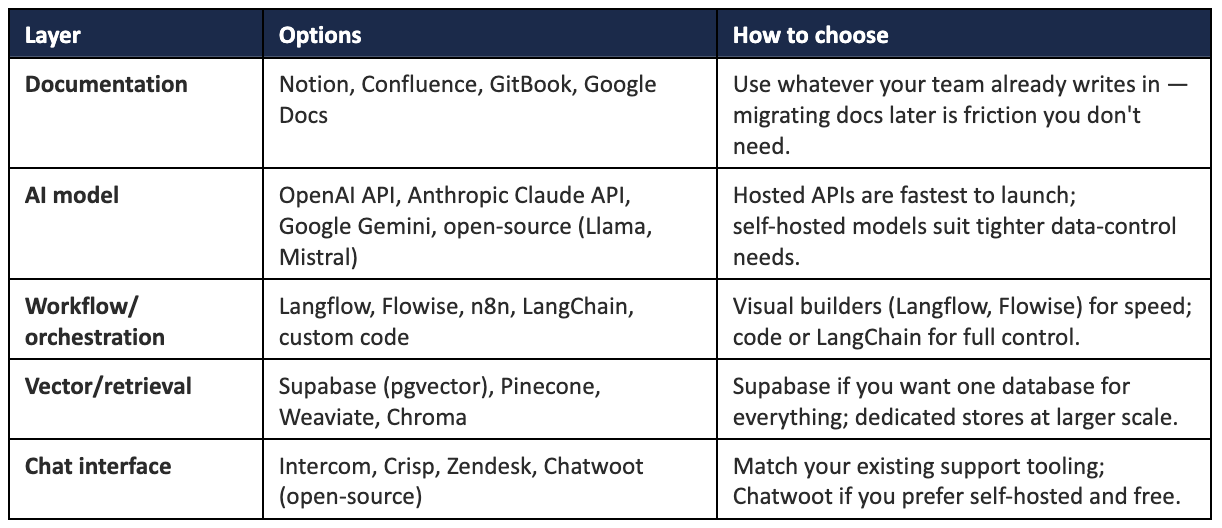
A useful principle: the architecture matters more than the specific brands. Any combination that connects these five layers will work.
A sensible starting default: Notion + a hosted AI API + Langflow + Supabase + Crisp
The Build Checklist
☐ Write documentation from the customer’s perspective: Cover the questions people actually ask, in their own words.
☐ Connect the documentation to your workflow: This becomes your knowledge base- the only source the assistant is permitted to draw from.
☐ Constrain the prompt with three rules: Answer only from the knowledge base; cite the source document; escalate when uncertain.
☐ Embed the widget and test thoroughly: Run your most difficult real tickets through it before customers do.
☐ Establish a clear escalation path: Define exactly when and how a conversation reaches a person, from day one.
☐ Log every escalation and feed it back into the docs weekly: Your escalation rate metric is useless if nobody closes the loop by writing the missing doc.
Measuring Whether It’s Working
Track four metrics from launch- together they tell you whether to adjust the documentation, the prompt, or the handoff:
• First response time: How quickly people receive any answer.
• Resolution rate: How often the assistant closes the loop on its own.
• Escalation rate: Consistently high suggests weak documentation; near zero suggests it’s guessing.
• CSAT: The metric that best reflects how support feels to the customer.
At Razorpay Rize, we get it- building a startup is tough. That’s why we’re more than just a space for connecting with other founders. We’ve got programs, tools, and services designed to take some of the weight off the shoulders and make the journey just a little bit easier.


Dive into Vault today & unlock a world of possibilities.