



Festive season buyers behave differently: they’re in gifting mode, comparing five tabs at once, and racing a shipping deadline in their head. The instinct is to install ten apps the week your sale starts. That doesn’t need a developer on retainer - it needs a short, tested stack and a plan for what to turn off in January.
The flow is straightforward:
Urgency & timing → Gifting & personalization → Engagement & discovery → Trust & social proof → Support & conversation → Checkout & shipping nudges
The Stack
There’s no need to over-invest here. Most of this stack has a usable free tier, and the paid upgrades only make sense once festive traffic actually justifies them. Pick based on how many storefront touchpoints you’re trying to cover versus how polished each one needs to look.
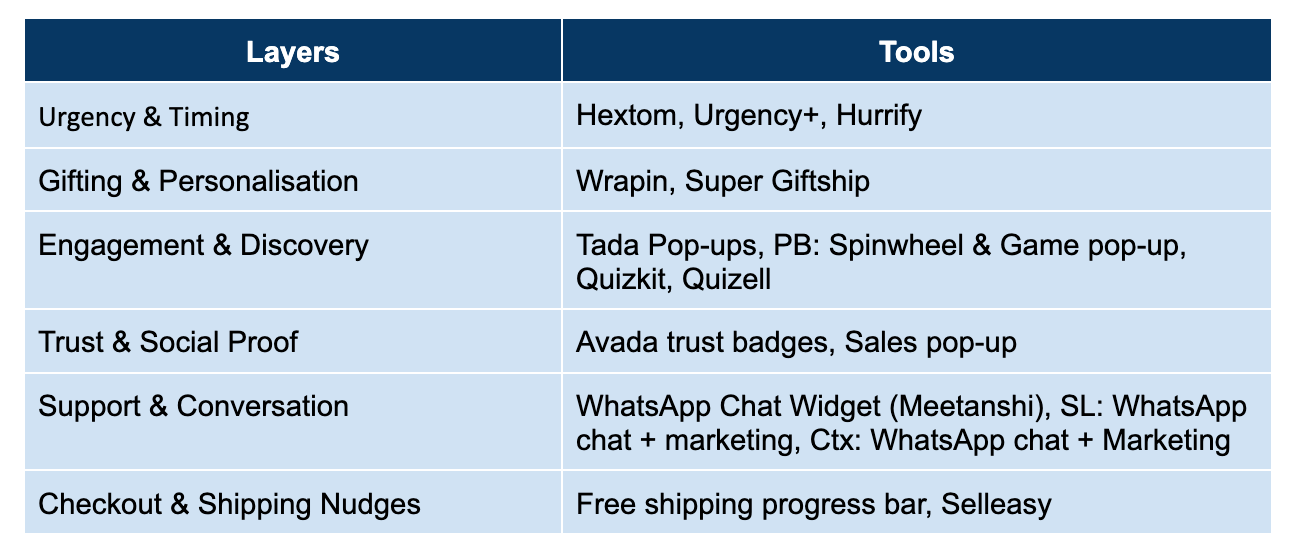
Urgency & Timing
Hextom: Countdown Timer Bar: A sticky bar with a live countdown for flash sales, shipping cutoffs, or holiday-specific promos. Free plan covers the basics; paid tiers add daily, periodic, and per-visitor timer types.
Urgency+ | All-in-one Countdown: Ships with 11 design templates, so the timer can actually match your festive banner instead of clashing with it.
Hurrify - FOMO Countdown Timer Bar: Built for scarcity messaging; pairs well with a stock counter if you’re running limited festive-edition drops.
Gifting & Personalisation
Wrapped - Gift Wrap & Message: Lets shoppers add paid or free gift wrap and a personal note before checkout. Free plan available, so it’s easy to test before the season without committing.
Super: Gift Wrap, Gift Message: Same job, with festive theme presets already built for Christmas, Valentine’s, and BFCM.
Giftship: For stores shipping to multiple recipients - lets one checkout send items to different addresses and auto-tags orders for fulfilment.
Engagement & Discovery
Tada Pop-ups (Spin Wheel & Games): On-brand spin-the-wheel popups to capture emails or phone numbers in exchange for a discount. Free plan available; gamified formats convert better than a plain “10% off” pop-up.
PB: Spin Wheel & Game Popups: A lighter alternative if you just want the wheel mechanic - free plan available, quick to theme in festive colours.
Quiz Kit / Quizell: A product-recommendation quiz (”find the perfect gift for her/him”) - useful when shoppers don’t know what to buy and would rather answer four questions than scroll forty products.
Trust & Social Proof
Avada Trust Badges & Sales Pop-up: Real-time “X just bought this” notifications plus trust badges - matters more in the festive season when buyers are making one-time gift purchases from brands they don’t know yet.
SALES POP UP: Fomo + Social Proof: Free tier, does the same job if you’d rather keep this widget off the paid-app bill this quarter.
Support & Conversation
WhatsApp Chat Widget (Meetanshi): Completely free, adds a floating WhatsApp button using the wa.me link - no API, no monthly fee.
SL: WhatsApp Chat + Marketing (SuperLemon): Free plan includes the chat widget plus a WhatsApp CRM extension, with an upgrade path if festive volume justifies cart recovery and broadcasts later.
Ctx: WhatsApp Chat + Marketing: Bundles chat, FAQs, and order tracking into one widget, so shoppers aren’t opening three separate tools to ask where their order is during peak shipping weeks.
Checkout & Shipping Nudges
Free shipping progress bar: Usually bundled into the urgency apps above rather than sold separately - check your existing app’s feature list before installing a new one just for this.
Selleasy: Cross-sell and upsell popups, including gift wrap, shown before checkout - a quick way to bump average order value on festive bundles without a dedicated app.
A useful principle: gamification and urgency widgets only pay off if the page still loads fast. Test each one’s speed impact before your highest-traffic week, not during it.
A sensible starting default: One countdown/urgency bar + one gift-wrap app + one WhatsApp support widget + a shared sheet tracking which discount codes are live where.
The Build Checklist
☐ Decide which festive moment you’re building for: Pushing the “last 48 hours before the shipping cutoff” gives every widget below something concrete to work toward.
☐ Theme every widget to match: A red countdown bar over a green spin wheel over your everyday brand colours reads as chaotic, not festive.
☐ Test on mobile before go-live: Countdown bars and spin wheels eat vertical space fast on a phone screen - check that your actual product content isn’t pushed below the fold.
☐ Turn off overlapping widgets: Two popups fighting for the same click (spin wheel and exit-intent discount) is a worse experience than either one alone.
☐ Set the end date before you launch: A countdown timer that quietly resets after it hits zero erodes trust faster than not having one at all.
☐ Recheck page speed after each widget goes live: Add them one at a time during a low-traffic day, not all five the morning your sale starts.
Measuring Whether It’s Working
Track these from the first campaign - together they tell you whether the stack is earning its shelf space or just adding noise:
• Page speed delta: How much slower the storefront gets with each widget added. If checkout abandonment rises alongside install count, something needs to come off.
• Conversion rate on festive traffic vs. baseline: Whether the urgency and gifting widgets are actually moving the needle, or just decorating a page that would have converted anyway.
• Opt-in and support volume through the widgets: Email/phone capture from spin wheels, and ticket volume through WhatsApp, both tell you which widget shoppers are actually using versus ignoring.
• Discount code redemption vs. leakage: How many gamified-popup codes get redeemed versus how many get shared on coupon sites - a gap here usually means the mechanic needs a cap or an expiry.
At Razorpay Rize, we get it- building a startup is tough. That’s why we’re more than just a space for connecting with other founders. We’ve got programs, tools, and services designed to take some of the weight off the shoulders and make the journey just a little bit easier.


Dive into Vault today & unlock a world of possibilities.