


Every founder ends up needing a page that isn’t the main website. A waitlist for a new feature. A one-off campaign for an event. A “coming soon” page thrown up before the product even exists. These don’t need a dev sprint- they need a few hours and the right stack.
The flow is straightforward:
Copy & design → Page builder → Hosting + domain → Forms → Analytics → Visitor
The Stack
There's no need to over-invest here. Most of this stack tops out at the cost of a domain name- often less than ₹1,000 a year. Pick based on how much design control you want versus how fast you need to ship.
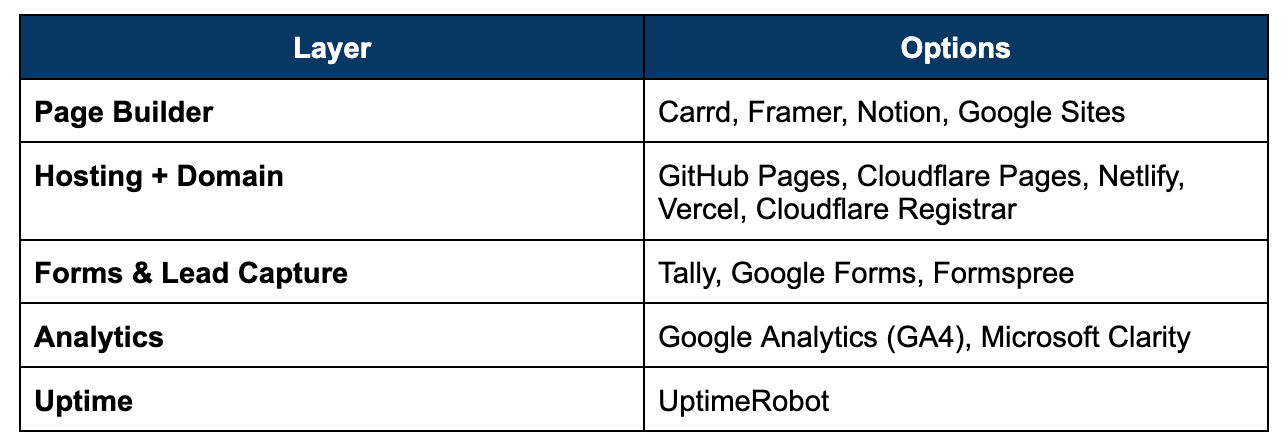
Page Builder
Carrd: Free plan covers 3 one-page sites (carrd.co subdomain, Carrd branding). Pro Lite removes the branding for $9/year, but connecting a custom domain needs Pro Standard at $19/year. Still the fastest way to a clean single-page site!
Framer: Free plan is genuinely capable for design and prototyping, but a custom domain requires the Basic plan (~$10/month). Worth it once the page needs real animation or a multi-page feel.
Notion: Turn any Notion page into a public site instantly, free, on a notion.site subdomain. Good for a quick microsite when design isn’t the point.
Google Sites: Fully free, including a custom domain if you already own one. Basic, but it works, and it’s the zero-friction default.
Hosting + Domain
GitHub Pages: Completely free static hosting if you’re comfortable with a bit of code or a static site generator.
Cloudflare Pages: Free tier includes unlimited bandwidth, and 500 builds a month- one of the most generous free hosting options available for a code-based page.
Netlify: Free tier includes forms and identity built in, which matters if you’re not using a separate forms tool. Bandwidth is capped, but rarely an issue at landing-page scale.
Vercel: Free “Hobby” tier is generous and the smoothest option if you’re already building in Next.js. Worth knowing the fine print: the free tier is for non-commercial use, which is a grey area if the page is selling something.
Cloudflare Registrar: For the domain itself, expect roughly $8-12/year at cost. Point it at whichever host you pick using free DNS.
Forms & Lead Capture
Tally: Free, unlimited forms, no response caps. Embeds cleanly into any of the builders above.
Google Forms: Free and familiar, though the embed looks more utilitarian than branded.
Formspree: Free tier handles a modest number of monthly submissions if you just need a plain HTML form to post to.
Analytics
Google Analytics (GA4): Free, and the default most people expect to see in a dashboard.
Microsoft Clarity: Free heatmaps and session recordings- shows you where people drop off, not just that they did.
Uptime
UptimeRobot: Free plan pings your page every few minutes and emails you the moment it goes down. Cheap insurance for something you’ll otherwise forget to check.
A useful principle: for a single-page campaign or waitlist, the builder-plus-domain combination matters more than the hosting choice underneath it. Don’t overthink the infrastructure for a page that’ll live for six weeks.
A sensible starting default: Carrd (or Framer, if you need more than one page) + a $9-12/year domain + Tally + Google Analytics + Microsoft Clarity
The Build Checklist
☐ Write the page around one action, not one product: Every landing page should ask the visitor to do exactly one thing- sign up, book a call, join a waitlist. Resist adding a second CTA.
☐ Buy the domain before you build: A custom domain takes ten minutes to point once you know where it’s landing.
☐ Wire the form to somewhere you’ll actually check: A Tally or Google Form response sitting unread is worse than not collecting the lead at all. Connect it to email or Slack.
☐ Add analytics before the first visitor, not after the first traffic spike: Retrofitting GA4 after a launch means losing the exact data you needed most- day one behaviour.
☐ Test the page on mobile, on a slow connection: Most first-touch traffic from ads or social lands on a phone. A page that looks great on your laptop can still load slowly or break on a 4G connection.
☐ Set up uptime monitoring if the page is tied to a launch or campaign: A dead page during a Product Hunt launch or a paid campaign is money and attention wasted for no reason.
Measuring Whether It’s Working
Track four metrics from the day the page goes live- together they tell you whether the problem is the page, the traffic, or the offer:
• Conversion rate: Visitors who complete the one action you asked for, divided by total visitors. This is the number that actually matters.
• Bounce rate: How many people leave without doing anything at all. High bounce with low time-on-page usually points to a mismatch between the traffic source and the page’s message.
• Load time: Anything over 2-3 seconds on mobile will quietly cost you conversions you’ll never see in the data.
• Traffic source breakdown: Knowing whether visitors arrived from a tweet, an ad, or a cold email tells you which channel is worth doubling down on- and which page needs a rewrite for that specific audience.
At Razorpay Rize, we get it- building a startup is tough. That’s why we’re more than just a space for connecting with other founders. We’ve got programs, tools, and services designed to take some of the weight off the shoulders and make the journey just a little bit easier.


Dive into Vault today & unlock a world of possibilities.