



This article is published in collaboration with Jitesh Dugar, AI Automation Specialist and verified n8n creator, who shares practical insights on building content workflows that actually save time.
For years, consistent content creation was one of the biggest advantages large brands had over smaller businesses. They had dedicated teams for research, copywriting, design, publishing, and analytics. Most founders, on the other hand, were forced to squeeze content creation between customer calls, product discussions, operations, and fundraising.
But something has changed.
The rise of generative AI has dramatically reduced the effort required to create content. At the same time, automation platforms have made it possible to connect different tools and workflows without writing complex code. Together, these technologies are changing how businesses approach marketing.
During a recent workshop, AI automation specialist and verified n8n creator Jitesh Dugar demonstrated exactly how this works in practice. Rather than discussing AI in theory, he showed founders how to build a complete content engine, from idea generation to social media publishing, using AI and automation tools that are available today.
Why Content Automation?
Content automation helps by taking care of repetitive workflows, allowing teams to maintain consistency while focusing their time on strategy, creativity, and growth.
Maintains consistency even when teams are busy with other priorities
Reduces time spent on repetitive tasks like research, scheduling, and publishing
Helps small teams achieve more without hiring additional resources
Speeds up content production from ideation to distribution
Reduces manual errors and missed publishing schedules
Creates scalable systems that grow with the business
Allows founders to focus on high-impact work such as customers, product, and growth
The Three Building Blocks Every Founder Needs to Understand
Jitesh explained that every single automation, no matter how complex, is built from just three things.
A Trigger
It’s the event that signals to the system that something has happened and that it’s time to respond. A customer places an order, fills out a form, sends a message, or signs up for a newsletter. Without a trigger, nothing moves.
Logic
This is where the system evaluates conditions, checks rules, and determines what should happen next.
Should the customer receive a welcome email? Should the request be routed to sales or support? Is the payment successful? Logic is what makes an automation feel intelligent rather than mechanical.
An action
It’s the thing the system does after processing the trigger through its logic. An email gets sent. A task gets created. A team member gets notified. A rider gets assigned.
For example: A food delivery app
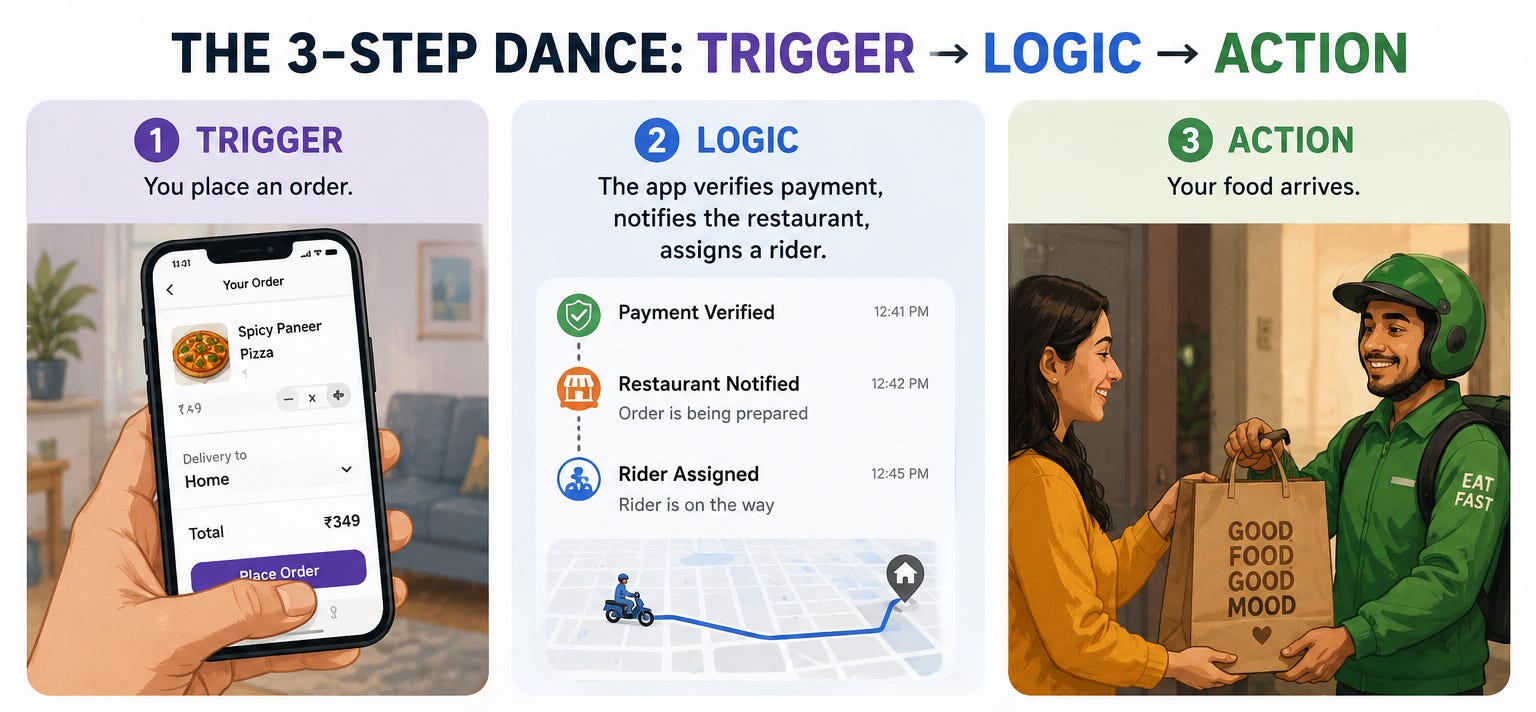
What makes modern automation powerful isn’t that it’s built differently. It’s that thousands of these simple Trigger, Logic & Action sequences can be connected together to create workflows that feel incredibly complex. It’s very much like the digital equivalent of cause, decision, and response.
No matter which automation tool you use, these three components remain at the heart of every workflow.
Choosing Your Automation Tool
Once you understand the framework, the next question is obvious: How do you actually build these automations?
Fortunately, a new generation of no-code and low-code platforms allows anyone- from solo founders to enterprise teams- to automate repetitive work, connect apps, and build workflows in hours instead of weeks.
Zapier is the veteran of the category. It connects thousands of apps, has a polished user experience, and is often the easiest place to start. The trade-off is cost. As your workflows become more complex or your automation volume increases, pricing can rise quickly.
Make.com strikes a balance between power and accessibility. Its visual workflow builder makes it easy to understand how data moves through a process, and it generally offers more flexibility per dollar than Zapier.
n8n has become a favourite among technical founders and startups. It’s open-source, highly customizable, and can be self-hosted, giving teams greater control over costs and data.
Pipedream is ideal for developers who want to combine code with automation. Instead of relying entirely on drag-and-drop interfaces, it allows you to insert custom logic wherever needed.
Relay.app focuses on human-in-the-loop workflows. Not every process should be fully automated, and Relay is designed for scenarios where people occasionally need to approve, review, or make decisions before the workflow continues.
However, n8n is what Jitesh chose for this session and for good reason. It’s AI-first in its design, low-code in its interface, and predictable in its pricing.
And there’s a 14-day free trial. Which means you can build something real this weekend before spending a rupee.
The First Workflow: Ideation Engine
To demonstrate what automation can actually do, Jitesh built a workflow live using a brand from the room. The example was Active Tribe, an intimate hygiene brand for active men.
The workflow was designed to solve a problem nearly every founder faces: coming up with fresh content ideas consistently.
Here’s how it works.
The Trigger: Every morning at 7:00 a.m., a Schedule node automatically kicks off the workflow. No manual intervention required.
The Research Layer: An RSS Reader node scans Google News for the latest stories and trends related to the brand’s niche, whether that’s men’s wellness, hygiene, fitness, or adjacent categories. Within seconds, it gathers a stream of relevant content.
The Intelligence Layer: Since not every trend is worth talking about, a Limit node filters the results down to the most relevant items. These are then passed to an OpenAI node, where a carefully crafted prompt instructs the AI to generate a complete content package: a post idea, an attention-grabbing hook, a caption, and even an image prompt.
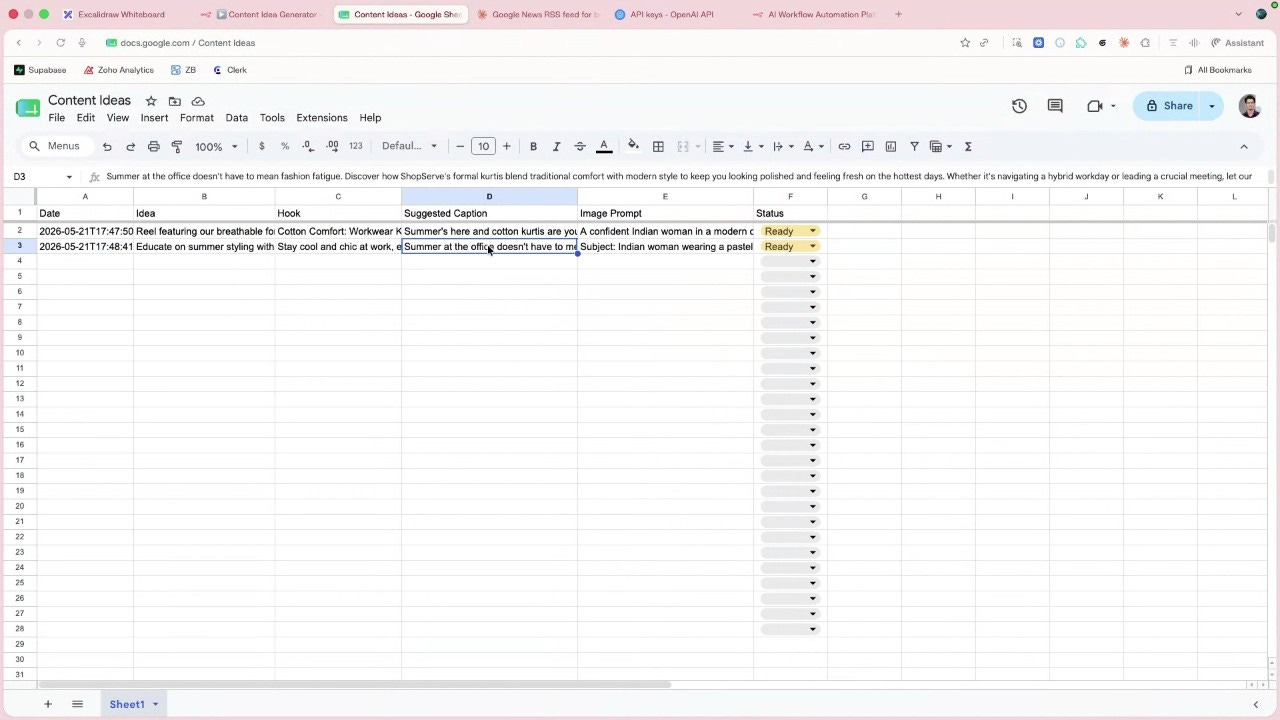
The Action: The output is cleaned up using an Edit Fields node and automatically added to a Google Sheet. By the time the team starts work, fresh content ideas are already waiting for them.
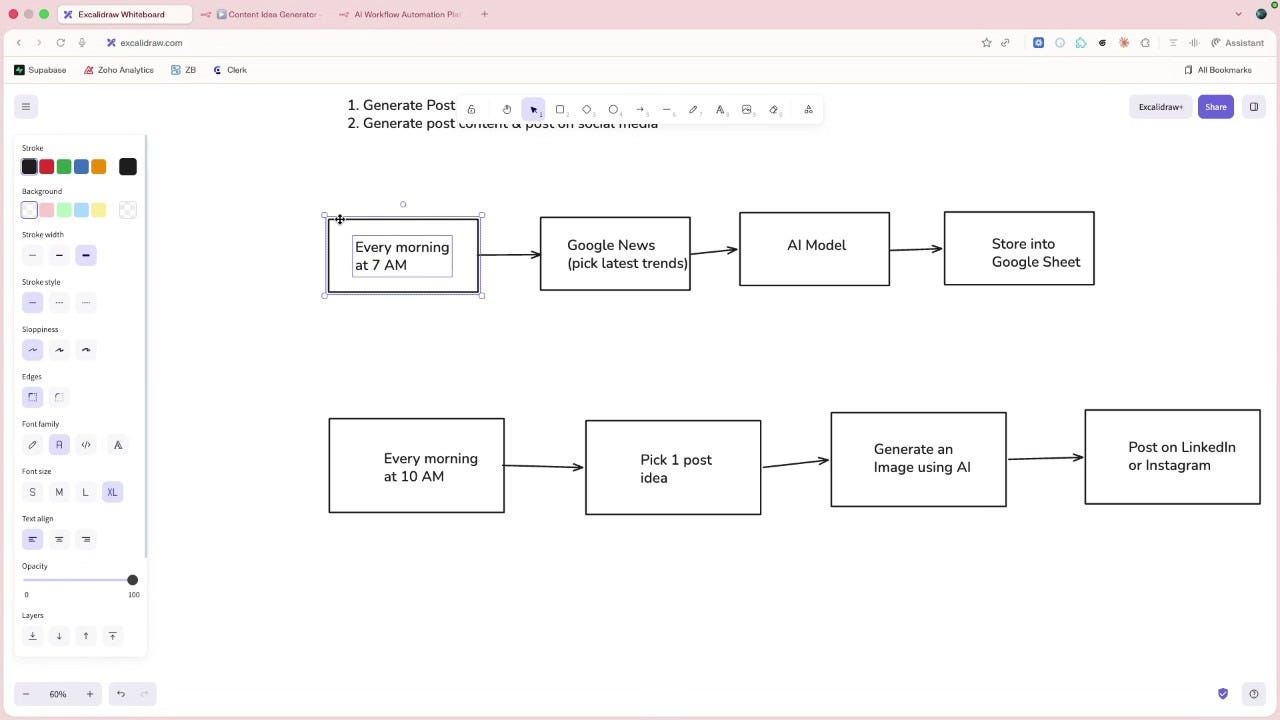
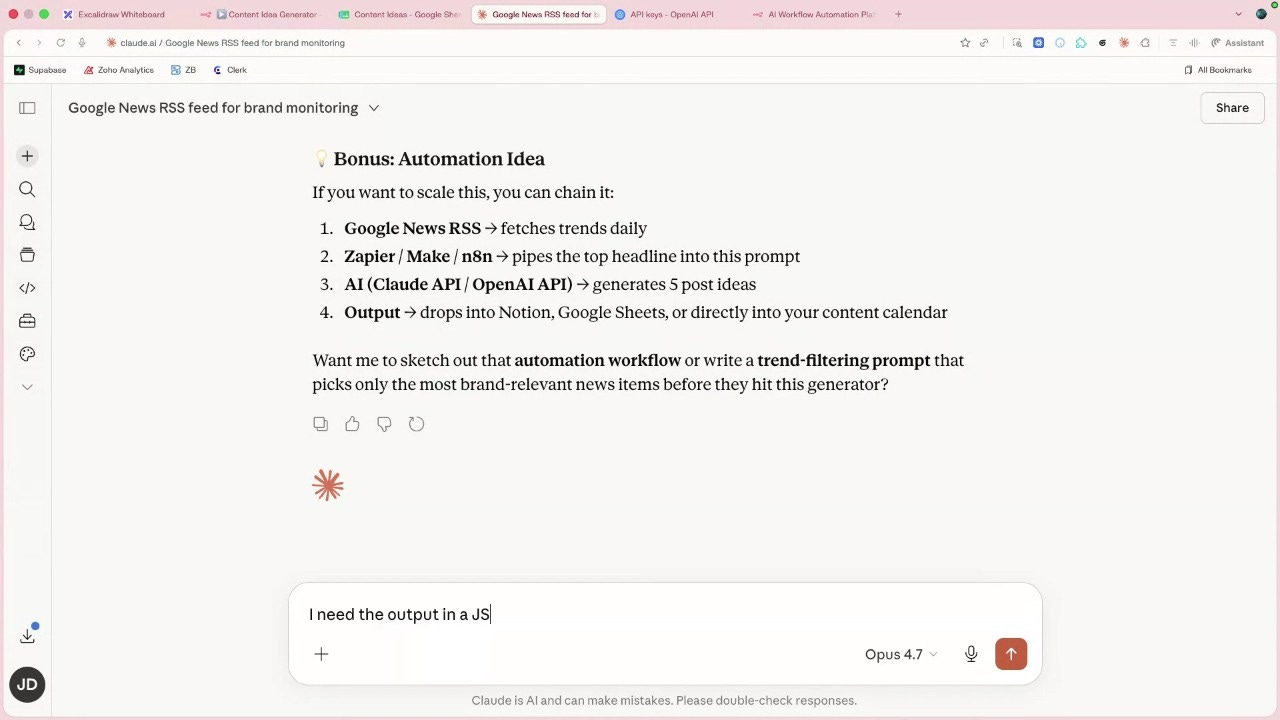
The Second Workflow: Publishing Engine
If the first workflow generates ideas, the second makes sure those ideas actually get published. Together, they create a complete content pipeline.
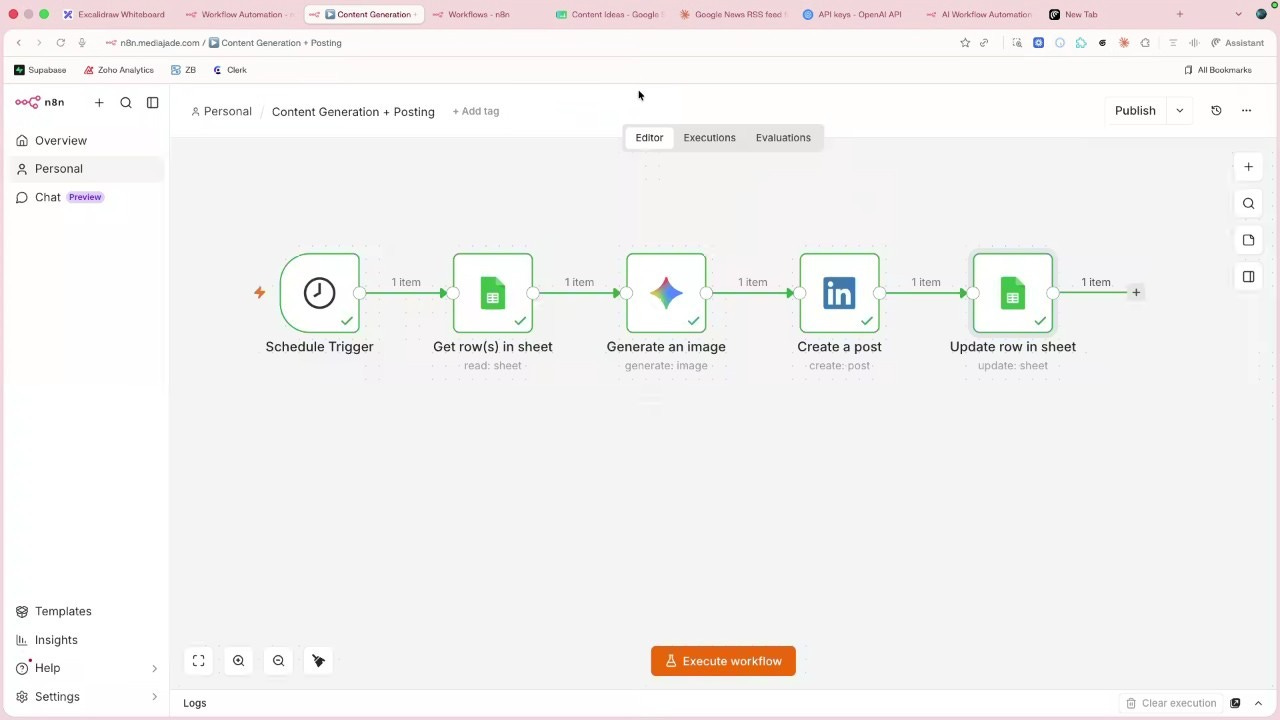
Step 1: The Trigger
At 10:00 a.m., a scheduled workflow automatically starts running.
Step 2: Pick the Next Post
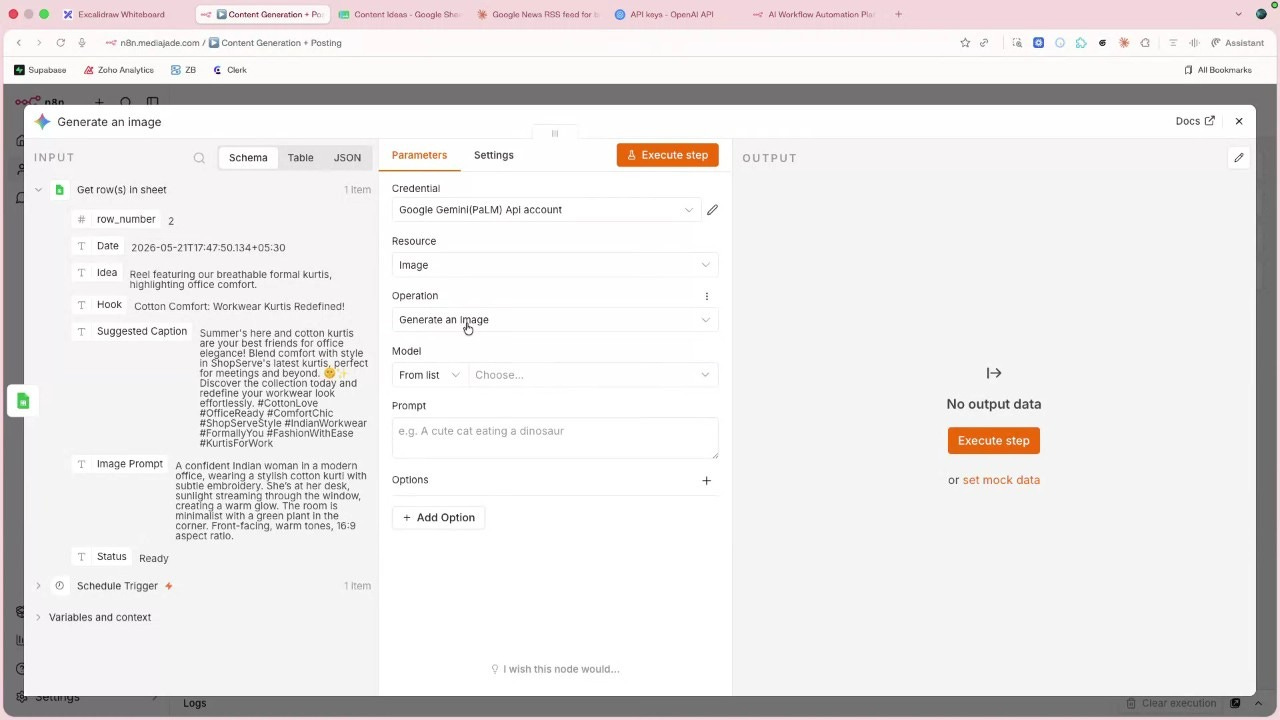
The workflow checks the Google Sheet and selects the first row marked “ready.” It processes one post at a time to keep things organised and avoid overlaps.
Step 3: Generate the Visual
Using the image prompt stored in the sheet, Google Gemini creates a custom image for the post.
Step 4: Publish the Content
The generated image is combined with the caption and automatically published to LinkedIn.
Step 5: Update the Status
Once the post is live, the workflow changes the status from “ready” to “posted,” ensuring the same content is never published twice.
The Question Every Founder Asks: Will My Account Get Banned?
It was one of the most practical questions of the session and one that almost every founder in the room was wondering about. What happens when you automate social media posting at scale? Is there a risk of getting your Instagram account suspended?
Jitesh’s response was straightforward.
The key is how you automate! If you’re using official APIs, such as Meta’s own API for Instagram, you are operating through channels that the platform explicitly supports. In those cases, the risk of suspension is extremely low. Problems typically arise when businesses rely on unofficial tools that scrape data, mimic user behaviour, or attempt to bypass platform restrictions.
There was a second caveat, though: Posting frequency matters!
Even if you’re using approved tools, posting every few minutes can look unnatural and trigger platform safeguards. If you’re posting every five or ten minutes, whether by hand or by bot, Instagram will flag it. The solution is to post at a human pace.
Automation, when done well, is almost invisible. It doesn’t make your brand look automated- it makes your operations look effortless.
Teaching AI Your Brand Voice
If the AI is creating the content, how do you stop it from sounding generic? How do you make sure it reflects your brand’s personality instead of producing the same captions everyone else is posting?
Jitesh shared two practical solutions:
Approach 1: Let AI Learn From Your Brand
Many AI models can access web content as part of their workflow. By directing the model to your website before it generates content, you give it context about your brand- your products, messaging, positioning, and communication style. Instead of creating content from a blank slate, it starts with an understanding of who you are.
Approach 2: Feed It Your Brand Guidelines
The simpler approach is often the most effective. Include your brand guidelines directly in the prompt. Define your tone of voice, key messages, preferred vocabulary, phrases you avoid, and the emotions you want your audience to feel.
AI is remarkably good at following instructions. The challenge is that most brands never give enough instructions to follow. The better your context, the better your output.
Final Thoughts
For years, building a consistent content presence felt like a luxury. It often required a dedicated marketing team, an agency partner, or a founder willing to spend late nights creating content after everything else was done.
A founder with the right systems can now create, refine, and publish content at a scale that would have seemed unrealistic just a few years ago.
The tools are here. The workflows work. And for founders willing to experiment, the gap between what they can imagine and what they can execute has never been smaller.
The only question now is: What will you build this week?


Dive into Vault today & unlock a world of possibilities.