


Every founder ends up doing sales before they’ve hired anyone to do it. The problem isn’t finding a list of names- it’s the hours lost finding contact details, writing forty personalised-sounding emails, and losing track of who replied. This doesn’t need an SDR team on day one. It needs a few hours and the right stack.
The flow is straightforward:
Lead sourcing → Enrichment → Outreach copy → Sequencing & sending → Reply tracking → Analytics
The Stack
There’s no need to over-invest here. Most of this stack is free up to a modest monthly volume- enough for an early founder doing outbound alone. Pick based on how much manual list-building you’re willing to do versus how fast you need contacts in hand.
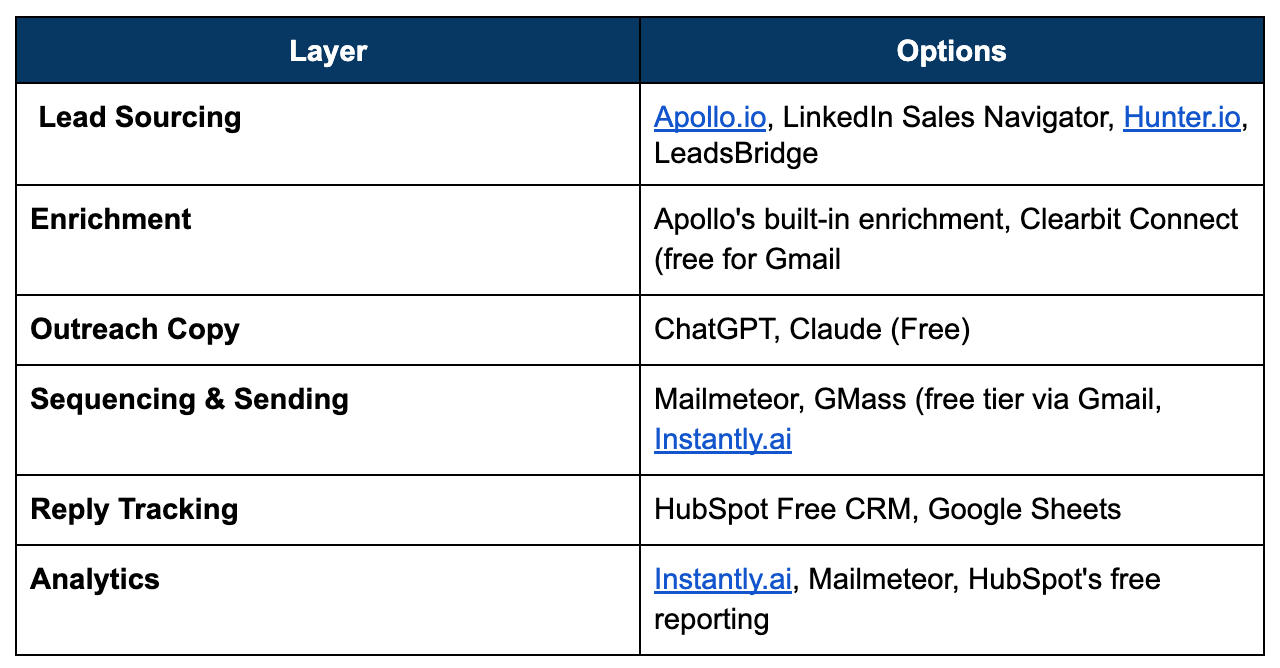
Lead Sourcing
Apollo.io: Free tier includes a limited number of verified contact credits a month, plus filters by role, industry, and company size- the fastest way to a usable list without a data team.
LinkedIn Sales Navigator: Not free, but the cheapest paid tier is often worth it for the search filters alone if your buyers are role-specific. Manual, but the data quality is hard to beat.
Hunter.io: Free tier finds and verifies email addresses for a given domain- useful once you already know which companies you want, just not who to email.
LeadsBridge: A marketing automation and integration platform that connects advertising platforms with CRMs, email marketing tools, and other business software.
Enrichment
Apollo’s built-in enrichment: If you’re already sourcing from Apollo, its free tier fills in title, company size, and LinkedIn URL without a second tool.
Clearbit Connect (free for Gmail): Pulls company and contact details straight into your inbox while you’re drafting- no separate dashboard to check.
Outreach Copy
ChatGPT / Claude (Free): Drafts a personalised first line from a prospect’s LinkedIn bio or company description in seconds- the manual version of this is what actually burns founder hours.
Lavender: Free tier gives real-time coaching on email length, tone, and readability as you write- catches the overly formal or overly long email before it’s sent.
Sequencing & Sending
Mailmeteor / GMass (free tier via Gmail): Sends personalised mail merges directly from Gmail, which keeps deliverability closer to a normal inbox than a dedicated sending tool at low volume.
Instantly.ai: Free trial covers a proper multi-step sequence with automatic follow-ups if a prospect doesn’t reply- worth it once single emails stop being enough.
Reply Tracking
HubSpot Free CRM: Free tier tracks every email opened, clicked, and replied to against a contact record- no spreadsheet to keep updating by hand.
A shared Google Sheet: Free, and genuinely fine at low volume- one row per prospect, one column for status, updated after every batch sent.
Analytics
Built-in sequencing analytics: Instantly and Mailmeteor both show open and reply rates on their free tier- usually enough to judge if a message is landing.
HubSpot’s free reporting: Rolls open, reply, and meeting-booked rates into one view if you’re already tracking there.
A useful principle: the best AI tool in this stack is the one drafting your first line, not the one sending the email. A well-personalised opener beats a perfectly sequenced but generic one every time.
A sensible starting default: Apollo’s free tier for sourcing + ChatGPT or Claude for first-line personalisation + Mailmeteor for sending + a shared Google Sheet for tracking.
The Build Checklist
☐ Define the exact person you’re emailing before opening a sourcing tool: A vague target (”startup founders”) returns a list that converts poorly. Be specific (”Series A fintech founders in India, hiring in the last 90 days”).
☐ Feed the AI real context: Paste in the prospect’s actual LinkedIn bio or company page before asking for a first line.
☐ Verify emails before sending: A bounced email doesn’t just fail to land- it quietly damages your domain’s sending reputation for every email after it.
☐ Cap the first send at a small batch: Fifteen to twenty emails on day one lets you catch a bad subject line or broken personalisation token before it goes out to two hundred people.
☐ Set a follow-up cadence before the first email goes out: Most replies come from the second or third touch, not the first. Decide the sequence in advance instead of manually remembering who to nudge.
☐ Log every reply, positive or negative: A “not interested” is still data. It tells you whether the message, the targeting, or the timing needs to change.
Measuring Whether It’s Working
Track four numbers from the first batch- together they tell you whether the problem is the list, the message, or the offer:
• Reply rate: Replies divided by emails delivered. This is the number that tells you if the message is actually landing with the audience you picked.
• Positive reply rate: Of the replies, how many are genuinely interested versus a polite no. A healthy overall reply rate with a low positive rate usually points to a targeting problem, not a copy problem.
• Meetings booked: The number that eventually matters most. Track it separately from replies- a lot of interested replies that never convert to a call signals friction in the follow-up.
• Bounce rate: Anything meaningfully above a low single-digit percentage means the list quality, not the message, needs fixing first.
At Razorpay Rize, we get it- building a startup is tough. That’s why we’re more than just a space for connecting with other founders. We’ve got programs, tools, and services designed to take some of the weight off the shoulders and make the journey just a little bit easier.


Dive into Vault today & unlock a world of possibilities.